


How To Add Fonts To GIMP and Inkscape | 3 Simple Steps
How To Add Fonts To GIMP and Inkscape | 3 Simple Steps https://logosbynick.com/wp-content/uploads/2018/11/add-fonts-to-gimp-inkscape-1024x602.jpg 1024 602 Nick Saporito https://secure.gravatar.com/avatar/8e31bf392f0ba8850f29a1a2e833cdd020909bfd44613c7e222072c40e031c34?s=96&d=mm&r=gThis is something I’m asked about quite often and figured it would make sense to finally put together this brief instructional on how to add fonts to GIMP and Inkscape. This method works the same regardless if you’re using Windows, Linux or Mac.
How To Install Fonts In GIMP and Inkscape
You don’t actually install the font into the application; you install it onto your operating system, then you’ll be able to use it with all of your applications. The process is quite simple…
Step 1: Find A Font
You’ll need to pick out a font to install. I like to use FontSquirrel.com because all of their fonts are free for both personal and commercial use. You can also find free fonts on sites like Dafont, but you have to be careful about how you use them because most of them are only free for personal use, and if you use them commercially or for client work you could be breaking copyright law.
If you’re doing work for a client, it may be a good idea to invest in some premium fonts.

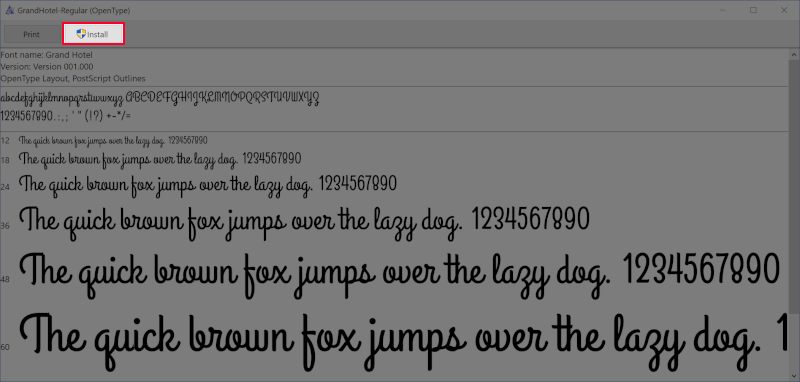
I’ll be installing the Grand Hotel font for use in GIMP and Inkscape
Step 2: Download & Install
Simply download the font from the font page. It usually comes packaged in a ZIP folder. Open the zip folder (no need to extract it if you’re using Windows) and look for the font file. It should end with either .ttf or .otf.
Double-click that file to open it, then somewhere near the top of the window you should see a button that says “Install”. Go ahead and click that button and the font will be added to your computer so you can use it with GIMP and Inkscape.
Step 3: Restart GIMP and Inkscape
If you already have GIMP and/or Inkscape open, you’ll have to close out of them and reopen again in order for the new font(s) to populate in the font directory. Once you’ve done that, your newly-added fonts should be ready to use.

Newly-added font populated in GIMP

And here’s how it looks in Inkscape
If any part of these instructions were unclear, please refer to the video tutorial at the top of the page or leave a comment below.
Fonts Still Not Showing?
I’ve been getting a lot of feedback lately from some of you who claim that your fonts still aren’t populating in Inkscape despite following these steps. I found a solution after looking into it a bit which you can read about here.
Learn To Master The SoftwareGain a complete understanding of your favorite design apps with my comprehensive collection of video courses. Each course grants access to our private community where you can ask questions and get help when needed.
|
||||||||||||||||||||||||||||||||

 81 Videos
 11 Modules



You might also like



16 comments
-
-
-
-
Iraiyadiaan
How to type tamil fonts, with the aid of some external applications like keyman in inkscape. The font appears in the list and letters look like box.
Couldn’t able to type even a single letter. -
Maria
I downloaded fonts from Font Squirrel and I cannot get them to load in Inkscape. I closed out Inkscape, when I re-opened it, I cannot get them. What am I doing wrong?
-
Nick Saporito
This is a glitch with Inkscape. I have a tutorial on how to fix it here: https://logosbynick.com/inkscape-fonts-are-missing/
-


Comments are closed.
Galyna Andriy
The website is and here article for fonts are very awesome and unique so I have a question about office fonts how to change the font style on the in the office and also can I used this type of the fonts style in the office