


Why Inkscape Fonts Are Missing Even Though You Installed Them
Why Inkscape Fonts Are Missing Even Though You Installed Them https://logosbynick.com/wp-content/uploads/2019/04/inkscape-fonts-are-missing-1024x602.jpg 1024 602 Nick Saporito https://secure.gravatar.com/avatar/8e31bf392f0ba8850f29a1a2e833cdd020909bfd44613c7e222072c40e031c34?s=96&d=mm&r=gIf you are a Windows 10 user you may run into a problem where Inkscape fonts are missing despite having installed them system-wide. In short, the reason why the Inkscape fonts are missing is because they haven’t been installed for all users. The fix is quite simple.
Before we get started, first make sure that you do indeed have your fonts installed on your system. I made a tutorial for this a while back that you can watch here. Whenever you want to use a font in Inkscape, you have to install it on your operating system first, then Inkscape should catalog it next time you launch it.
Quick Fix: Inkscape Fonts are Missing
| If your fonts are populating in other applications but not Inkscape, it’s most likely because the font needs to be installed for all users. This is thanks to a recent Windows update. |
Step 1: Restart Inkscape
The reason why your Inkscape fonts are missing could be because you haven’t restarted the Inkscape application since installing them. In order for your newly installed font to populate in Inkscape, you have to close out of the application and reopen it.
Step 2: Install for All Users
Thanks to a tip I received from a student of my Inkscape Master Class, apparently Inkscape won’t recognize a font that’s only installed for one Windows user — it has to be installed for all users. I never had this problem personally because I’ve always been the sole user on my Windows machines.
Instead of opening the font file and clicking the “Install” button, simply right-click the font file and select “Install for all users”. This should do the trick.
One caveat that I’d like to add, thanks to a tip from a Reddit user, is that in order to see the “Install for all users” option, you need to 1.) be using a machine that has more than one Windows user account, and 2.) the font file must be placed locally on your hard drive.
UPDATE September 2019: After a recent Windows update I started having this problem as well. The fonts that I previously installed were all there, but new fonts now have to be installed for “all users,” even though I’m the only user on this machine.
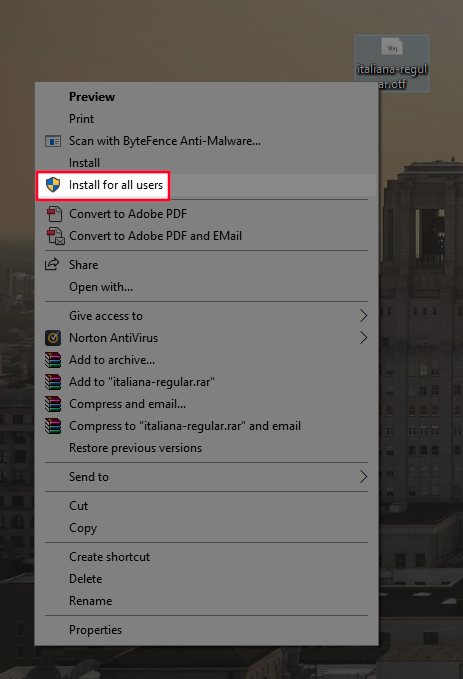
If you’re like me, you’ve probably gotten in the habit of installing fonts directly from the zip folder they came in, but in order to install the font for all users, you’ll need to drag and drop the file somewhere else, like your desktop.
Once you’ve installed the font for all users, go ahead and relaunch Inkscape. Your Inkscape fonts should no longer be missing.
Learn To Master The SoftwareGain a complete understanding of your favorite design apps with my comprehensive collection of video courses. Each course grants access to our private community where you can ask questions and get help when needed.
|
||||||||||||||||||||||||||||||||

 81 Videos
 11 Modules



You might also like



102 comments
-
-
razak
I installed RBNo3.1 fonts for all users but It didn’t work for me
This font is installed on windows 10 and I can perfectly use it (all face) in others application such as MS Office, illustrator etc but not Inskcape. Only showing Black & Black Italic face
-
Josef
I tried everything for a family of fonts (*.otf) but I only see the the normal and the italic font in inkscape. The other options (like bold, light and so on) are not there. What can I do?
-
Anonymous
I have an issue with a font I am using. I can see it in the list. I can use it for awhile. Then it just stops working. I saved, closed, reopened… It will let me change to that font but the look if the font on the screen does not change. It is so odd because I am already using the font on the same document layer.
-
-
-
Pam Breedlove
I always install my fonts for all users because I already knew that this was an issue with some programs, but not all fonts are showing in Inkscape regardless. Is there any other solution you can offer?
-
-
Nick Saporito
I’m not sure why else fonts would not be showing up. It sounds like the newer releases of Inkscape have come with a variety of new problems that need to be addressed. Sorry I couldn’t help more than that!
-
-
Japanda
Extract the font zip folder. Go to new location, open folder, right click on the font name, “INSTALL FOR ALL USERS” then it will work.
-
-
-
Ricard
It didn’t work for me 🙁
This font is installed on windows 10 and I can perfectly use it in MS Office applications like word or excel.
This font is Opem font type, it is not True Type wich work fine in Inkscape.
But despite I installed it for all the users, when it comes to Inkscape it loads it wrongly so I can’t really use it.
If anybody had the same problem and can give me some piece of advice I’ll be very grateful.
Thanks!
-
-
-
-
-
-
-
Anonymous
The 2019 update to this post worked for me. Thank you so much, the work you do is amazing.
-
-
Tammy Novak
Nick,
Do you know how I can fix the missing fonts in Inkscape if I deleted all the zip files from my Download file? In hindsight, I probably should have extracted all of them into a file on my desktop, but of course I didn’t. Is there somewhere in Windows where all my fonts are stored that I can access and adjust to all users? (I, too, am the only user on this computer… Windows 10)
Thank you!-
Nick Saporito
I don’t remember where exactly but there is a folder with all of the fonts installed in Windows. I think it’s C: > Windows > Fonts.
-
-
-


Comments are closed.
jtech452
In case the font is named with non-english letters, this will also prevent install. to get around this, just rename the file. See the very end of this thread: https://inkscape.org/forums/questions/installed-fonts-do-not-appear/
In my case, the font was for Chinese simplified characters, and was naturally named something in Chinese characters. Once I renamed it something in english letters, it installed no problem.