


12 Free Flat Vector Avatars for Inkscape + Tutorial
12 Free Flat Vector Avatars for Inkscape + Tutorial https://logosbynick.com/wp-content/uploads/2020/06/flat-vector-avatars.png 800 470 Nick Saporito https://secure.gravatar.com/avatar/8e31bf392f0ba8850f29a1a2e833cdd020909bfd44613c7e222072c40e031c34?s=96&d=mm&r=gToday I’ll be sharing a pack of 12 free flat style vector avatar faces that you can download and edit however you’d like. Check the video tutorial to learn how to create your own using Inkscape:
Flat Vector Avatars
Learning how to create these faces in Inkscape is just a matter of working with basic shapes like squares, circles, and polygons. You can then add colors and accent pieces of your choosing.
Here’s a breakdown of the steps taken to create a male face. As you can see, each shape is created individually and layered on top of each other.
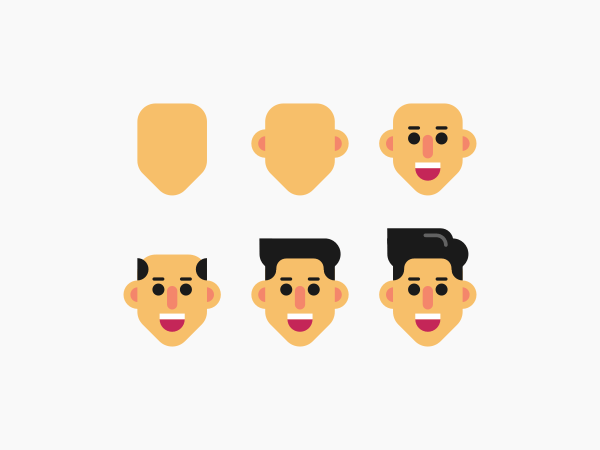
In addition to the shape tools, you’ll also have to supplement with other tools like the Bezier Pen and the Nodes tool in order to have more granular control of the shapes of your objects. In the video tutorial at the top of the page I also used the new Corners path effect from Inkscape version 1.0.
Here’s another breakdown demonstrating how to design a female avatar…
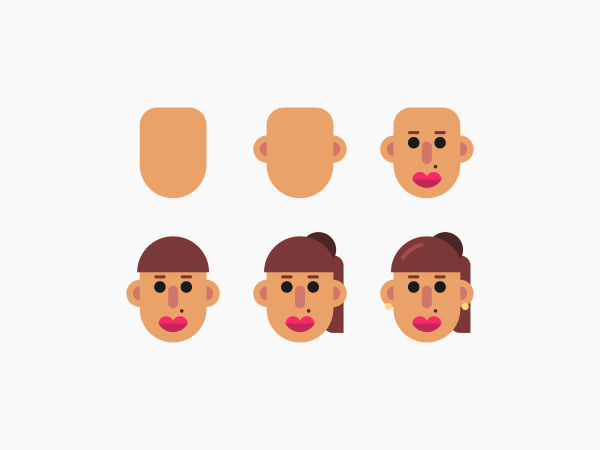
Free Download
Below you can download a free pack of 12 vector avatars designed by yours truly. The designs are as follows…

Once you’ve downloaded them you can mix and match different elements, colors, body parts, etc. however you’d like.
The vector avatars can be downloaded here: vector-avatars.zip
The format provided is a vector PDF document. To open it, open up Inkscape and then click and drag the PDF document onto your canvas to import it. Once imported, ungroup everything by pressing control + shift + g, and then the designs should be available for use.
Usage Rights
I’m releasing these designs into the public domain so feel free to use them however you’d like, including personal and commercial use. No attribution necessary. All I ask is that you please do not re-upload the vector files for these designs anywhere else, or list them for sale on a stock photo site or any other marketplace.
If you have any questions please leave a comment below. As always, thanks for watching!
Learn To Master The SoftwareGain a complete understanding of your favorite design apps with my comprehensive collection of video courses. Each course grants access to our private community where you can ask questions and get help when needed.
|
||||||||||||||||||||||||||||||||
 81 Videos
 11 Modules

You might also like
18 comments
-
-
-
-
-
Antho
Hi!
Thanks a lot Nick!One question : I’ve followed the tuto but on the last step I cannot make a rounded extremity when I cut patch of the hair shadow effect. Any idea to resolve that?
Antho
-
Nick Saporito
Yes, in the fill & stroke menu, look under the stroke tab for an icon that says rounded cap.
-
-
Ola Babajide
Great tutorial Nick,
Thank you so much.Just to bring to you notice, I’m finding it hard to drop a message through the contact form, could you possible share you email address or please get in touch with me by my email sir.
Thank you.


Comments are closed.
Tallon99
Been gettin stuck into your videos. So easy to follow and pick up on what’s happening.
One thing that I haven’t run across yet is making text 3D wrap around a globe, like the Daily Planet logo. I know Inkscape doesn’t do motion, I just want to get that effect where it looks like it is in mid orbit.