

Free Contact Icons for Business Cards
Free Contact Icons for Business Cards https://logosbynick.com/wp-content/uploads/2016/09/contacticonshead.png 850 500 Nick Saporito https://secure.gravatar.com/avatar/8e31bf392f0ba8850f29a1a2e833cdd020909bfd44613c7e222072c40e031c34?s=96&d=mm&r=gFree contact icons: if you’re doing any kind of design work, chances are you’ll need to include contact information on something at some point, usually on business cards. This tends to be the case on a regular basis for me, at least.
In order to make the design have a more polished and professional look overall, I usually like to include icons before each segment of the contact information, as depicted in the following example of a business card design…

For the longest time I would actually waste a significant amount of time re-creating these icons for each individual project, or go rummaging through past projects where I had used them so I could snag & drop them into a project I was currently working on. I’ve since come to my senses and put together a pack of these icons for me to reference and use in any project that calls for contact information to be included.
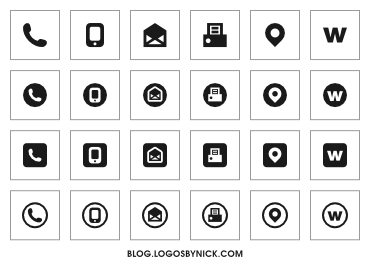
Going in order from left to right, the contact values included are: phone, mobile, email, fax, address, and website URL. Those are typically the only values you’ll need for the majority of projects you’ll work on. You’ll also need a set of social media icons as that’s treated as a communication tool these days as well. You can download my set of social media icons here.
These icons were designed to be immediately recognizable as what they represent, and also to be recognizable at small sizes. You’ll notice that I’ve included various different designs for each (standalone, circle, square, etc.)
The icon pack can be downloaded here: Contact-Icon-Pack.zip
Feel free to use these icons for your own projects — personal use, commercial use, client work, or whatever else. Be sure to leave me some feedback in the comments. Enjoy!
Learn To Master The SoftwareGain a complete understanding of your favorite design apps with my comprehensive collection of video courses. Each course grants access to our private community where you can ask questions and get help when needed.
|
||||||||||||||||||||||||||||||||
 81 Videos
 11 Modules


You might also like
106 comments
-
-
-
-
-
Ian
Hi Nick, Just chanced upon this looking for contacts icons for my first business card. Great resource page and Thank you!
I did download the contact -Icon Pack but, all I get is one file “ContactIcons.svg” and cannot open it. What am I doing wrong? Any help would be very much appreciated.Thanks again for sharing your work with all of us.
-
Nick Saporito
Hi Ian, it’s a vector format, meaning you’ll need vector graphics software in order to to open and edit them. Either Adobe Illustrator or if you’re looking for a free alternative I would recommend Inkscape.
-
-
Ian
Hi Nick, Just chanced upon this looking for contacts icons for my first business card. Great resource page and Thank you!
I did download the contact -Icon Pack but, all I get is one file “ContactIcons.svg” and cannot open it. What am I doing wrong? Any help would be very much appreciated.Thanks again for sharing your work with all of us.
-
-
-
-
T. N.
Hey I just wanted to say thanks for the free download that is actually free without having to leave any information and hopefully no cookies tracking. I haven’t had a chance to use them so hopefully they’ll work for me but at any rate thanks for being true to your word, preciate it. I be back to check out your logos
-
Nick Saporito
Glad to help. Yes, the designs are completely free. No catch whatsoever. My payoff comes in the form of additional traffic to the site, higher search rankings and established trust with viewers, which all leads to eventual new business. It’s the give-to-get method of marketing and it’s never failed me 🙂
-
-
T. N.
Hey I just wanted to say thanks for the free download that is actually free without having to leave any information and hopefully no cookies tracking. I haven’t had a chance to use them so hopefully they’ll work for me but at any rate thanks for being true to your word, preciate it. I be back to check out your logos
-
-
-
Hüs
Hello Nick!
Thank you for your job. I appreciate so munch your demonstrations. Your illustrations are just clear to learn. Courage to you in your passion…
-
Hüs
Hello Nick!
Thank you for your job. I appreciate so munch your demonstrations. Your illustrations are just clear to learn. Courage to you in your passion…
-
-
-
-
-
-
Claude Suritz
Retired… and so switching from .A.I. to Inkscape. Thank you for the tutorials and for the downloads
Belgium
-
Claude Suritz
Retired… and so switching from .A.I. to Inkscape. Thank you for the tutorials and for the downloads
Belgium
-


Anonymous
Awesome work, Thank you.